


Many people think that once the interview is over, the pain is over, but that is not the case: Did I pass or not!!! At this point, besides waiting, you can also check the visa status. So, how do you check it? Currently, U.S. visa applicants can check their visa application progress through two methods, each with different progress and methods of inquiry.
1. Non-immigrant visa progress (Online inquiry opened by the U.S. Department of State):
Enter the inquiry page, select non-immigrant visa, choose the consular district for the visa application and submit the DS-160 code to check.
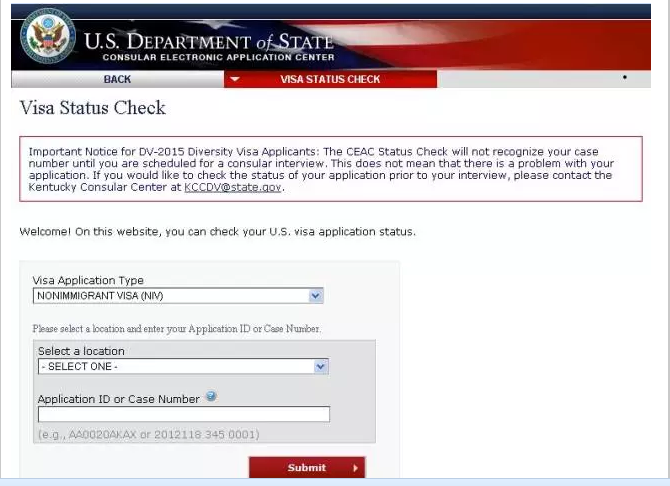
If you enter a valid DS-160 number, your visa status will be displayed. Note: Some updates are slow, and if it shows "administrative processing," it may not necessarily be administrative processing. It is advisable to check again 3-5 business days after submission. If the status is "temporarily refused" due to the need for additional documents, please check again 3-5 business days after submitting the materials.
- Administrative Processing:
Your visa case is currently undergoing necessary administrative processing. This processing can take several weeks. Please follow any instructions provided by the Consular Officer at the time of your interview. If further information is needed, you will be contacted. If your visa application is approved, it will be processed and mailed/available within two business days.
Your visa is under review. If it is administrative processing, you will just have to wait.
- Issued:
Your visa is in final processing. If you have not received it in more than 10 working days, please see the webpage for contact information of the embassy or consulate where you submitted your application.
Visa issued. If you have not received the visa after 10 working days, please directly contact the embassy or consulate where you submitted the visa application.
- Refused:
The case has been refused for a reason other than those listed in Administrative Processing.
The visa was refused due to a reason during administrative processing.
2. Passport website progress and meanings (CGI - U.S. government designated outsourcing company):
Meaning of tracker messages
"Your passport is In Transit To Post." = is yet to deliver your passport to the Consulate. It is in between the Stanley location and Consulate.
Your passport is still on the way to the embassy or consulate (estimated to be delivered by a third party).
"Your passport is Delivered To Post." = delivered your passport to the Consulate.
Your passport has been delivered to the embassy or consulate.
"Your passport is still with post" = your passport is still in the Consulate.
Your passport is still at the embassy or consulate.
"Your passport is Origination Scan." = U.S. Consulate has filled in your Courier slip but is awaiting Courier Company to pick it / Courier Company is in the process of issuing an AWB/Reference code.
Your passport has been printed and is ready to be sent to the designated location.
"Your passport is In Transit From Post." = The passport with or without the visa is now being transported by courier to the pickup location that you specified at the time of creating the appointment. Please check the location of pickup on your U.S. Consulate appointment invitation letter.
Your passport has been sent to the designated pickup center.
"Your passport is Ready For Pickup." = It has arrived at the Pickup location. For some, it may be the Facilitation Center.
You can pick up your passport at the designated CITIC Bank. According to feedback from netizens, the status is sometimes inaccurate, so if you are in a hurry, you can directly call the U.S. Visa Application Center or CITIC Bank for inquiries.